If your schools has set up delayed behaviour events, you are able to control the time and day of the week that they will trigger.
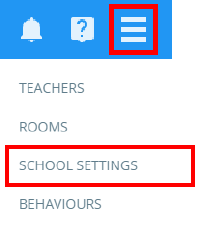
To control when delayed behaviour events are evaluated, click on the three lines menu in the top right hand corner of the page and select School Settings from the list of available options.
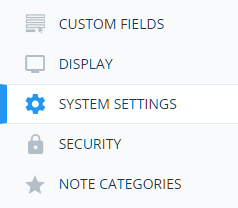
Next, click on System Settings from the menu on the left hand side.
You will be presented with the Delayed behaviour events section. The available options are described in more detail below:
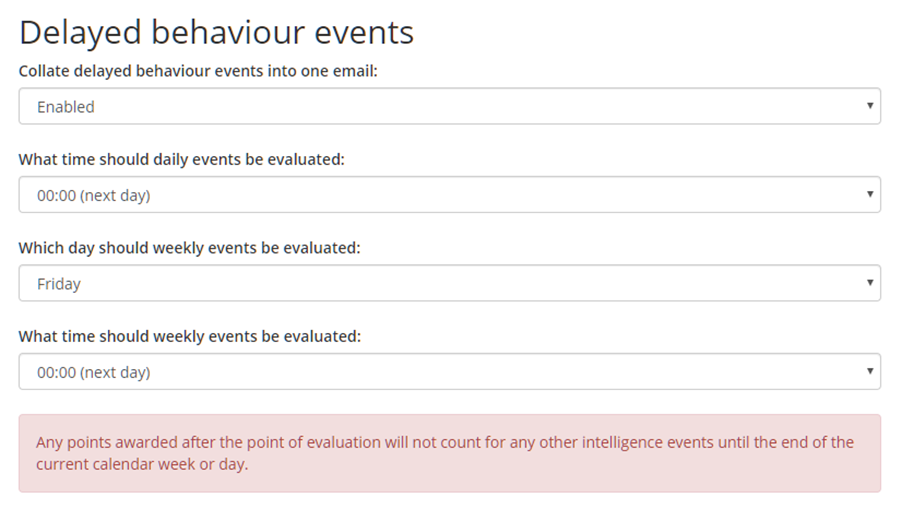
Collate delayed behaviour events into one email: This setting controls whether or not notified users will receive an email for each pupil that triggered an event, or a single collated email.
What time should daily events be evaluated: This setting controls when delayed behaviour events that use day as the time period will be evaluated.
Which day should weekly events be evaluated: This setting controls the day that delayed behaviour events which use week as the time period will be evaluated.
What time should weekly events be evaluated: This setting controls when delayed behaviour events that use week as the time period will be evaluated.
Was this article helpful?
That’s Great!
Thank you for your feedback
Sorry! We couldn't be helpful
Thank you for your feedback
Feedback sent
We appreciate your effort and will try to fix the article