The activity feed is a live stream of all behaviour incidents, intelligence events, detentions and pupils notes added by staff in your school’s Class Charts account.
To access your school’s activity feed, click on the Activity tab at the top of the page.

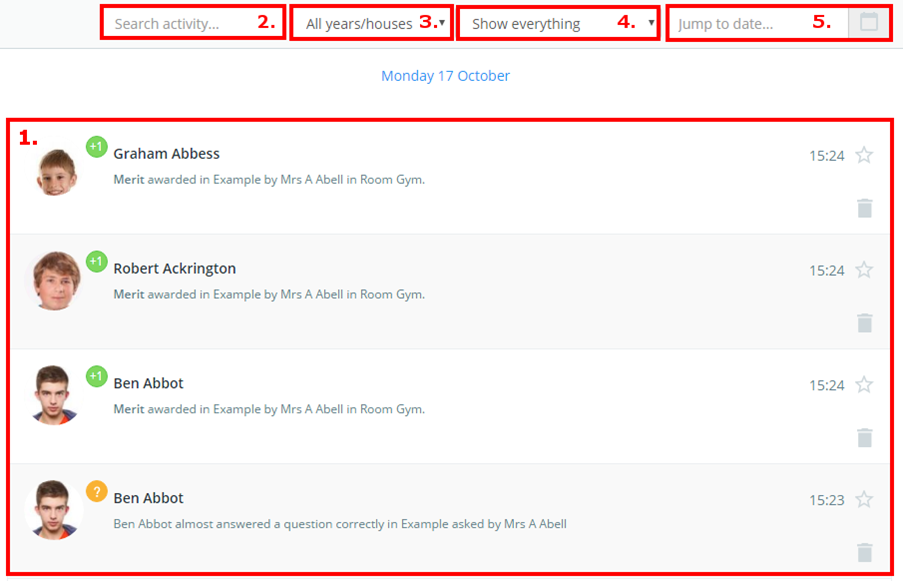
You will be presented with a list of behaviour activity across the whole school (1), where new behaviour incidents appear in real time.
The activity feed can be searched by entering keywords (2) or filtered by a certain group of students (3), certain types of events (4), and from a defined date range (5).
Clicking on a behaviour log will open it up for more options. You can add notes, view outcomes, leave a comment, change the date, and refer the incident to another member of staff (How to refer a behaviour/detention to another staff member).
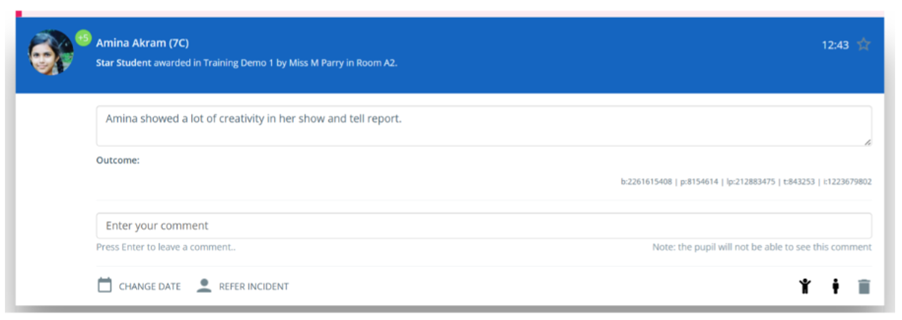
You can also use the behaviour log to open Messaging with pupils and parents, by clicking the icons on the bottom right of the log. You can delete the behaviour log by clicking on the bin icon.
Was this article helpful?
That’s Great!
Thank you for your feedback
Sorry! We couldn't be helpful
Thank you for your feedback
Feedback sent
We appreciate your effort and will try to fix the article