When issuing detentions through Class Charts, a date must be scheduled for each issued detention. Alternatively, you can set up a default date for all detentions in order to save teachers valuable time when issuing detentions.
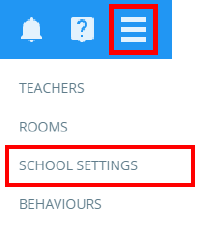
To set a default date for all detentions, click on the three lines menu and select School Settings from the list of available options.
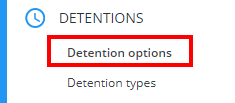
Next, click on the Detentions tab from the left hand menu and select Detention options.
Locate the setting labelled Set default detention date (weekends excluded) and select a default date option from the drop down menu. The available options are explained below:
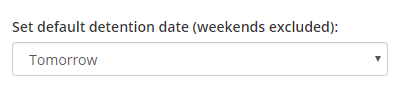
None: If selected, the detention will always be displayed in the Unscheduled section of the Detentions manager without a date specified.
Today: If selected, the detention will always be displayed in the Today section of the Detentions manager, scheduled for today’s date.
Tomorrow: If selected, the detention will always be scheduled for the following day.
1 week later: If selected, the detention will always be scheduled for exactly one week’s time.
Next Monday: If selected, the detention will always be scheduled for the following Monday.
Next Tuesday: If selected, the detention will always be scheduled for the following Tuesday.
Next Wednesday: If selected, the detention will always be scheduled for the following Wednesday.
Next Thursday: If selected, the detention will always be scheduled for the following Thursday.
Next Friday: If selected, the detention will always be scheduled for the following Friday.
Was this article helpful?
That’s Great!
Thank you for your feedback
Sorry! We couldn't be helpful
Thank you for your feedback
Feedback sent
We appreciate your effort and will try to fix the article