If your Class Charts account is synced up to your school’s SIMS database, outcomes created in SIMS will be pulled through into Class Charts.
If your Class Charts account is not synced with SIMS and behaviour outcomes have been enabled, you can create your own custom outcomes.
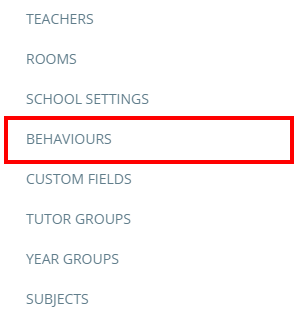
To set up behaviour outcomes, click on the three lines menu in the top right hand corner of the page and select Behaviours from the list of available options.
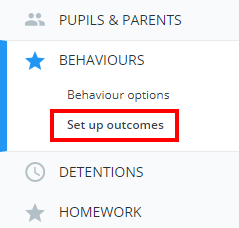
Next, select Set up outcomes from the menu on the left hand side.
This will take you to the Behaviour Outcomes page. There are two outcome lists: one for positive outcomes and one for negative outcomes. Click on the Positive and Negative headings to switch between the two.
To add your own behaviour outcomes, enter a name for the outcome into the text box highlighted below and click on the Add button.
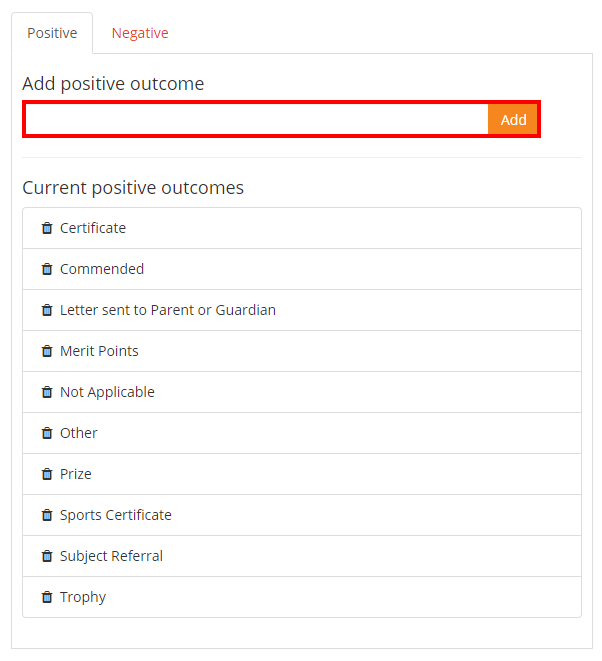
Once set up, your school’s available outcomes can be applied to awarded behaviour.
Deleting an outcome
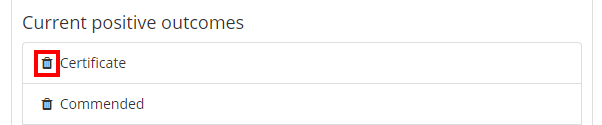
To delete an outcome from the list, click on the bin icon next to an outcome.
Was this article helpful?
That’s Great!
Thank you for your feedback
Sorry! We couldn't be helpful
Thank you for your feedback
Feedback sent
We appreciate your effort and will try to fix the article