When issuing a detention to a pupil, you are given the option to share the detention behaviour type with the pupil’s parents.
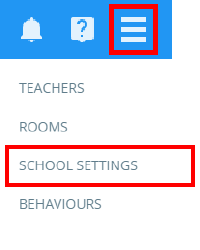
To set up the ability to share detention behaviour types with parents, click on the three lines menu and select School settings from the list of available options.
Next, click on the Pupils & Parents tab on the left hand side.
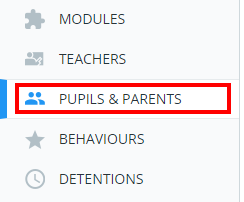
You will be presented with a list of settings which control what is shared with pupils and parents. Ensure that the setting labelled Email detention behaviour type to parents is set to Enabled.

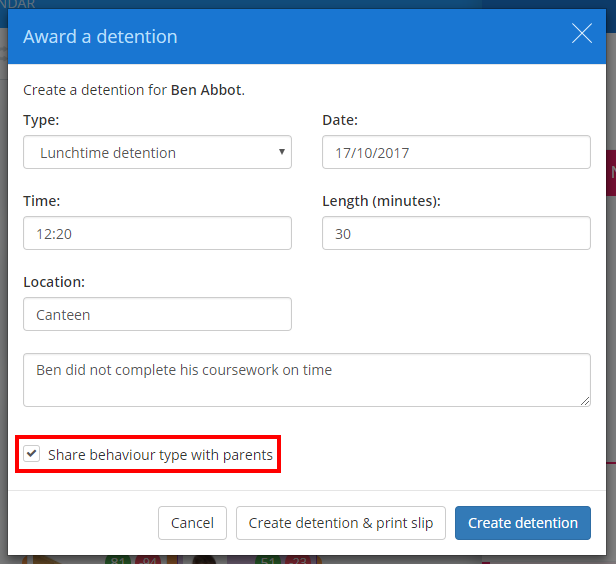
The next time a detention is issued to a pupil, an additional checkbox labelled Share behaviour type with parents will be displayed. Tick this checkbox to successfully share the behaviour type.
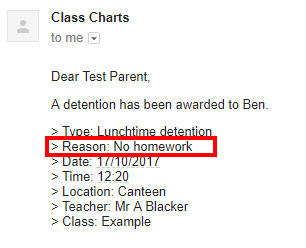
When the parent receives an email notification regarding the detention, the behaviour type will be included in the list of detention details.
Was this article helpful?
That’s Great!
Thank you for your feedback
Sorry! We couldn't be helpful
Thank you for your feedback
Feedback sent
We appreciate your effort and will try to fix the article